A capable label maker turns a drawer full of mystery cables, pantry containers, school folders, and storage bins into a system you can understand at a glance. You’ll find the right fit among compact travel options, keyboard-driven models, and wider-format machines designed for home offices, workshops, and small businesses. These picks span different label sizes and workflows, so the key is choosing the one that matches how you organize.
The Main Contenders

SUPVAN E10 Bluetooth Label Maker, Green

SUPVAN G15M Mini Label Maker
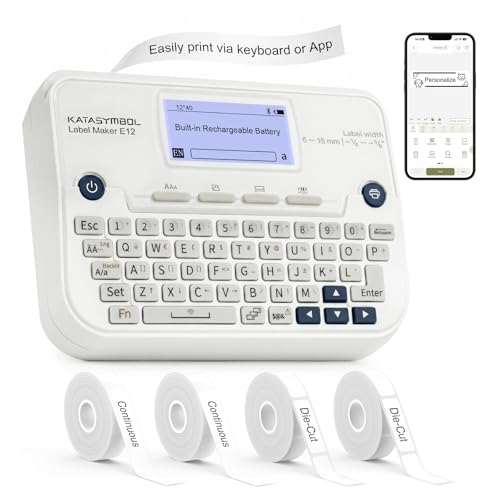
SUPVAN E12 Keyboard Label Maker

SUPVAN T50M Pro Label Maker, Black

SUPVAN G15M Keyboard Heat Shrink Label Maker

SUPVAN E11 Keyboard Label Maker
Taking A Closer Look At The Options
Bluetooth-based editing makes the E10 approachable for labeling pantry jars, school folders, storage boxes, and household cables. Compared with the keyboard-equipped models later in this list, it favors a phone or tablet workflow, which may suit you better for custom text and graphics but less well for rapid repetitive entries.
The three-tape bundle gives you supplies for several immediate projects without requiring a separate first purchase. Its rechargeable format also helps during a move-out, home-office reset, or school-supply organization session, although dedicated keyboard entry could feel more natural for a large labeling project.
Useful Touches
- Bluetooth editing gives you a larger screen for composing labels on your phone.
- Three included tapes support an immediate start for containers, folders, and cables.
- The app requires no registration fee or account charge, keeping setup uncomplicated.
- No ink or toner means routine maintenance is limited mainly to tape handling.
Small Caveats
- Phone-based control adds a step when your main task is printing many short labels.
- Keep the tape compartment clean, since adhesive residue can interfere with loading and feed accuracy.
Feature Snapshot
Made For
You’ll appreciate this model most for home, classroom, or small-office labeling driven by a phone.
Another Choice May Suit
The SUPVAN E12 Keyboard Label Maker fits people who produce many labels quickly from the machine itself.
The G15M Mini makes sense for a technician carrying it between a patch panel, garage shelf, and equipment case. Its compact 3.35-by-6.7-by-1.7-inch body takes less room than the E10’s general-purpose setup, yet the supported media provide room for several kinds of identification work.
Heat shrink tubes wrap around wiring, while fixed and continuous labels suit containers and cable runs. The 0.88-pound weight and rechargeable 1,200 mAh battery strengthen its portable profile, though its narrower media focus may not serve large packages as neatly as the T50M Pro.
Everyday Advantages
- Heat shrink compatibility supports durable wire identification after the tube contracts around a cable.
- Four media categories cover cables, fixed labels, and continuous strips.
- Compact dimensions suit a tool bag, drawer, or mobile equipment case.
- The battery can provide up to three months of use per charge under stated conditions.
Practical Considerations
- Use matching media sizes and clean the print path when adhesive builds up around the mechanism.
- Very wide shipping labels fall outside its strongest use case.
Quick Facts
Right Fit For
Mobile technicians, garage organizers, and frequent travelers benefit most from this compact format.
A Better Fit Elsewhere
The SUPVAN T50M Pro Label Maker, Black suits packaging tasks requiring labels from 3/4 inch to 2 inches wide.
A physical keyboard changes the pace of repetitive labeling, and that is the E12’s clearest distinction from the app-led E10. You can type short names directly on the machine during a school-prep session, then use Bluetooth when a folder, pantry label, or office file needs a more customized design.
The backlit LCD, a display that illuminates for easier visibility, helps you review text in bright rooms or dimmer cabinets. Four tapes broaden the initial supply, making this a practical middle ground for active classrooms, home offices, and shared family organization.
Useful Strengths
- On-machine keyboard entry speeds up repeated names, dates, and numbered folders.
- The backlit screen makes text easier to check in varied lighting.
- Bluetooth app editing extends flexibility beyond quick keyboard entries.
- Four tapes provide useful coverage for school files, pantry items, and storage containers.
Minor Gripes
- You’ll still need a phone or tablet for the most involved custom layouts.
- Store tape rolls away from dust and wipe the exit area periodically to support reliable feeding.
Who It Suits Best
Teachers, students, and home-office users benefit from the balance of keyboard speed and app-based design.
Consider Something Else
The SUPVAN E10 Bluetooth Label Maker, Green is a simpler fit for organization centered mainly on phone editing.
Wider labels shift the T50M Pro toward jars, storage bins, bottles, and product packaging rather than tiny cable identifiers. Its 3/4-to-2-inch label range gives you more room for descriptive text, barcodes, QR codes, or branding on a small-business workflow.
App editing from a phone, tablet, or computer adds useful flexibility for importing visual elements and refining layouts. Compared with the compact G15M Mini, this machine prioritizes readable width over pocket-sized handling, which can feel worthwhile during a batch labeling session.
The Practical Payoff
- A wide label range produces more legible storage and packaging labels.
- App editing supports images, product information, codes, and brand graphics.
- The larger format suits pantry containers, bottles, bins, and shipment materials.
- Computer support offers a more comfortable editing screen for complex designs.
Trade Offs To Consider
- Its size and weight may feel excessive for a small carry-on labeling kit.
- Roll handling and cleaning matter more with wide adhesive media, so keep the mechanism covered when stored.
Technical Highlights
Built With In Mind
Home organizers and small-business owners gain the most from its generous label width.
Where A Sibling Pick Shines
The SUPVAN G15M Mini Label Maker is more practical for compact tools and close-range cable work.
Technical labeling narrows the focus of this G15M configuration. It targets electrical wiring, network cables, terminal blocks, patch panels, and equipment identification, giving technicians a more purposeful toolkit than a general household organizer needs.
The keyboard supports faster text entry during dense labeling runs, while Bluetooth provides another route for customized content. Eleven listed media categories add considerable flexibility, although anyone labeling mostly jars or shipping boxes may find that broader support unnecessary.
Practical Pluses
- Eleven media types support cables, panels, equipment, and general organization.
- Keyboard entry keeps repeated circuit and port names moving quickly.
- Heat shrink labels remain wrapped around the wire after application.
- Bluetooth editing adds flexibility for technical diagrams or custom text.
Where It May Fall Short
- The professional focus offers little advantage for straightforward pantry labeling.
- Heat shrink placement requires accurate sizing and careful handling, so damaged tubes may need replacement.
Best Suited To
Network installers, electricians, workshop operators, and facility teams fit this model’s purpose.
Reach For A Different Pick
The SUPVAN E11 Keyboard Label Maker better serves mixed home and office labeling without a technical focus.
The E11 brings together the two workflows most people cycle between: quick keyboard entries and customized Bluetooth designs. That balance makes it useful for pantry jars, garage tools, office folders, and school supplies, particularly in an apartment where storage space should stay compact.
Its 1,200 mAh rechargeable battery is stated to last up to one month per charge, supporting cordless projects around a kitchen or utility closet. Four included tapes help you begin immediately, though the E12 may be worth closer consideration for classrooms that depend heavily on its backlit display.
Points In Its Favor
- Keyboard and Bluetooth inputs suit both quick and custom label jobs.
- Four tapes cover immediate storage, office, and school projects.
- The rechargeable battery avoids disposable power changes during normal use.
- Its cordless format simplifies temporary labeling stations in small homes.
Details To Watch
- The stated battery duration can vary with label volume and Bluetooth use.
- Keep unused tape sealed and the feed path clean to reduce dust and adhesive buildup.
Essential Details
Whose Shelf It Belongs On
Apartment residents, families, and home-office users get the most flexible everyday setup.
Look Elsewhere
The SUPVAN E12 Keyboard Label Maker offers a backlit display for people working across changing lighting conditions.
Choosing the Right Labeling Workflow
Start with the labels you actually use. Heat shrink tubes are sleeves placed around a wire and heat-shrunk into place, while cable flags project outward from a cable. Container users should check tape width first, and workshop-focused setups should prioritize compatible technical media.
Consider how you prefer to enter text. Keyboard models reduce friction during repetitive jobs, whereas Bluetooth editing offers a larger screen for images, QR codes, and detailed layouts. A dual-input device can cover both styles, but app compatibility should fit your phone or computer setup.
Battery life and storage deserve equal attention. A rechargeable model is useful around the house, while compact dimensions matter more for a technician moving between equipment. Keep the machine covered, store tape rolls tightly, and wipe away adhesive residue to support smooth feeding over time.
Media Compatibility Sets the Range
A machine that handles fixed labels, continuous strips, cable markers, and heat shrink tubes gives you more freedom across rooms and equipment. Wider models suit bottles, bins, and packaging, while compact units favor close-range cable identification and portable kits.
Keyboards Help With Repetition
Typing directly on a label maker removes repeated phone unlocking for simple names, dates, and numbered folders. Bluetooth still matters for graphics and longer layouts, so a dual-input design offers the most balanced workflow for mixed organization.
Practical Decisions Before You Order
Mistakes Worth Dodging
Avoid judging a label maker only by its appearance. Confirm supported media dimensions and connection requirements before ordering, especially for heat shrink work. Choosing a wider model for ordinary containers can add unnecessary bulk, while a compact model may frustrate you on large packages.
What Separates Premium From Basic
Higher-tier models tend to add wider labels, more media formats, physical keyboards, or brighter displays. Those features matter for repeated professional jobs or mixed workflows; simple home organization can work well with a smaller app-based model.
Frequently Asked Questions
Do label makers require ink or toner?
The SUPVAN models in this roundup rely on label media rather than ink or toner. Routine use mainly involves loading tape and keeping the mechanism clean.
Which type is best for cable labeling?
The SUPVAN G15M choices suit cable work, with heat shrink and other cable-specific media listed as supported options. The keyboard version may be more convenient for technicians entering repeated port or circuit names.
Can Bluetooth label makers work without a keyboard?
The E10 uses Bluetooth-based app editing rather than a listed physical keyboard. The E11, E12, and T50M Pro combine device-based workflows with app connectivity to varying degrees.
Are wider labels better for home organization?
Wider labels improve readability for jars, bins, and food containers, but they are unnecessary for every cable or spice jar. A compact model can serve small labels, while the T50M Pro offers a 3/4-to-2-inch range.
How should a label maker be stored?
Keep the machine away from dust, heat, and direct moisture, and store unused tape rolls in their protective packaging. Periodically clearing adhesive residue from the feed path supports more consistent printing.
