Apartment organization goes wrong when unlabeled bins, mystery cables, and pantry jars turn into a small storage crisis. These label makers suit renters, students, home cooks, and remote workers who want clear markings without bulky equipment or complicated setup. Consider print method, label width, charging needs, and whether your labeling is mostly kitchen, cable, office, or moving-related.
The Picks In Brief

SUPVAN E10 Bluetooth Label Maker 3-Tape Green Bundle
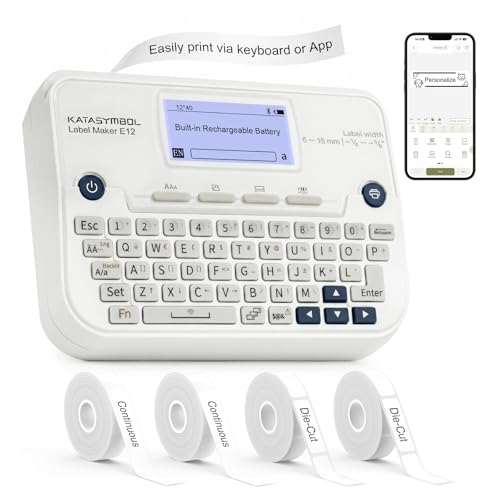
SUPVAN E12 Keyboard & Bluetooth Label Maker 4-Tape Set

SUPVAN G15M Mini Portable Label Maker with Heat Shrink

SUPVAN T50M Pro Bluetooth Label Maker with Tape, Black

SUPVAN G15M Keyboard & Bluetooth Label Maker with Heat Shrink

SUPVAN E11 Keyboard & Bluetooth Label Maker 4-Tape Set
The Picks, Examined More Closely
The E10 favors a straightforward route into labeling, with phone-based editing and Bluetooth connectivity doing most of the setup work. For your first apartment reset, that simplicity matters: you can move from an unlabeled storage tote to a finished mark without learning a separate keyboard or carrying a desktop printer.
Compared with the keyboard-equipped E12 and E11, this model gives you fewer direct controls, though its three-tape bundle still gives you supplies for several immediate projects. The app requires no registration or fee, and the rechargeable battery can last about a month on a charge, based on its stated use profile.
Practical Pluses
- Three included tapes support a useful mix of early apartment projects.
- App editing handles text, symbols, and custom labels from a connected phone.
- No ink or toner removes cartridge refills from the ownership routine.
- The rechargeable design suits closets, kitchens, and shared workspaces without a cable during short projects.
Small Caveats
- Phone-based editing may feel less direct during repeated labeling sessions than the E12 keyboard.
- Keep the device away from moisture and dust, since exposed electronic labelers need occasional wiping and careful storage.
Who It Suits Best
You benefit most from the E10 as a first apartment organizer who mainly labels bins, pantry goods, school materials, and everyday cables.
A Better Fit Elsewhere
Choose the SUPVAN E12 instead for heavy, repeated labeling where direct keyboard entry and a backlit display add efficiency.
The E12 is built for days when your phone screen becomes an interruption. Its physical keyboard supports rapid entry of short names, room numbers, and file categories, while Bluetooth app editing remains available for more customized layouts. That combination works well during a kitchen restock, move-in session, or shared-office cleanup.
Unlike the E10, you get an illuminated display that improves text visibility in dim closets and evening work areas. The four included tapes reduce the need for an immediate supply run, although exact tape sizes are not provided here, so matching them to a particular drawer or container deserves a closer look at the listing.
What Pays Off
- Direct keyboard entry speeds up short, repetitive labels.
- Bluetooth app editing provides a second route for custom designs.
- The backlit LCD keeps text easier to check in low light.
- Four tapes provide a practical starting stock for several rooms.
Practical Considerations
- The keyboard adds bulk compared with the phone-first E10.
- You may prefer the app for symbols or graphics that are quicker to compose visually.
- Store tapes away from heat and direct sunlight to reduce curling or premature drying.
Made For
The E12 fits apartment residents who balance kitchen, office, school, and household labeling throughout the week.
Where A Sibling Pick Shines
The SUPVAN T50M Pro is the stronger fit for unusually wide labels or graphics-heavy projects, while the E12 handles routine text more directly.
Storage constraints make the G15M Mini appealing for apartments, rentals, and dorm rooms. It measures 3.35 by 6.7 by 1.7 inches and weighs 0.88 pounds, so it can move between a utility closet, kitchen shelf, and cable drawer without taking over valuable work surface.
Its broader advantage is media compatibility. Heat-shrink tubing wraps around cables after shrinking around them, while continuous, fixed-size, and cable labels serve containers and equipment. The built-in 1,200 mAh battery is stated to last up to three months per charge, though your labeling frequency will determine how quickly that estimate changes.
The Good Stuff
- Four label formats broaden its use across storage, wiring, and garage projects.
- The compact body fits naturally into apartment cabinets and portable kits.
- Heat-shrink compatibility supports clearer identification for permanently routed cables.
- A 1,200 mAh rechargeable battery reduces daily charging interruptions.
- Minimal-margin printing helps place text efficiently on compact labels.
Things To Weigh
- Multiple media types can feel unnecessary for plain bin labeling.
- Heating heat-shrink tubing adds a separate step compared with adhesive labels.
- Check the correct tape or tube dimensions before purchasing additional supplies.
Feature Snapshot
Right Fit For
You get the most from the G15M Mini in a small home, rental, or dorm where limited storage space and mixed cable labeling are common.
Another Choice May Suit
The SUPVAN E10 is a cleaner fit for a new organizer who mainly needs app-created household labels and no technical cable media.
The T50M Pro reaches beyond ordinary text labels with a stated 3/4-inch to 2-inch print range. That width makes it useful for pantry containers, moving boxes, document folders, address labels, barcodes, QR codes, and branding work in a home-based business.
Bluetooth editing from a phone, tablet, or computer gives you more design flexibility than the text-oriented E12. In a busy kitchen or apartment office, that difference may justify the larger format, though the broad feature set makes the E12 more appealing for quick, repetitive labels.
Everyday Wins
- Wide output supports readable moving and pantry labels.
- Phone, tablet, and computer editing suits multiple workspaces.
- Image and branding options help you organize a home business.
- QR codes and barcodes support practical inventory and shipping tasks.
Less-Strong Areas
- A physical keyboard is not specified, so short repeated labels may favor the E12.
- Graphics-heavy projects demand more app time than plain text entry.
- Wide labels can be excessive for slim shelves and small cable channels.
Core Details
Built With In Mind
The T50M Pro suits creative apartment residents, remote workers, and home-based businesses that need more than narrow text labels.
Reach For A Different Pick When
Choose the SUPVAN E12 for fast keyboard-driven pantry and office labels, or the G15M Mini for a much smaller footprint.
The keyboard-equipped G15M shifts toward technical labeling rather than general apartment housekeeping. It supports 11 label types, including heat-shrink tubes, cable wraps, flags, marking tags, continuous labels, and die-cut labels. That range makes it relevant to wiring, network cables, terminal blocks, patch panels, and equipment inventories.
For a plain kitchen drawer, those capabilities may be excessive, but your home workshop or network closet can benefit from the same focused control. Bluetooth editing adds custom layouts, while the keyboard provides a faster path for repeated equipment codes, depending on your comfort with technical terminology.
A Few Highlights
- Eleven media types cover permanent and removable identification needs.
- Heat-shrink labels suit wiring that may move inside an appliance or network closet.
- Cable flags and wraps add flexibility to densely packed connections.
- Keyboard entry speeds up repeated technical names and port numbers.
Details To Watch
- Technical media may be unnecessary for simple pantry labeling.
- Heat-shrink installation requires correct sizing and heat application.
- Label rolls and tubing need dry, moderate storage to remain usable.
Whose Shelf It Belongs On
This G15M fits apartment residents who maintain electronics, network wiring, appliances, tools, or workshop equipment on a regular basis.
Swap It Out When
The SUPVAN E10 is the easier fit for storage bins and pantry goods, while this model favors specialized cable and equipment identification.
The E11 offers a familiar middle ground between the phone-led E10 and the more feature-rich T50M Pro. You can type short labels on its keyboard, then use Bluetooth app editing for customized designs. That flexibility suits a room-by-room move, pantry refresh, garage tool session, or shared household supply.
Its four tapes provide an immediate starting assortment, while the 1,200 mAh rechargeable battery is stated to last up to one month per charge. Compared with the E12, the available information does not identify a backlit display, so confirm the interface and tape dimensions against your setup before committing.
Practical Advantages
- Keyboard entry makes repeated room and container names efficient.
- Bluetooth editing supports more personalized labels.
- Four tapes help cover several organization categories immediately.
- The rechargeable battery simplifies routine use without disposable cells.
- The general-purpose format works across kitchen, garage, office, and school.
Some Limits To Know
- No backlit display is identified in the available details.
- Specialized cable media is not established for this model.
- Keep adhesive tape away from damp utility areas and excess heat.
Feature Facts
Who Will Love This
You’ll appreciate the E11 as a renter, student, or remote worker who wants keyboard speed and phone-based creativity in one compact routine.
Where Another Pick Suits Better
The SUPVAN E12 is preferable for low-light labeling thanks to its stated backlit display, while the E11 remains the broader everyday choice.
What Matters in an Apartment Labeling Setup
Choose by Label Purpose
Start with the surfaces you need to mark, not the machine’s broadest advertised capability. Pantry jars, moving boxes, and office files may need only short text, while network cables and equipment benefit from specialized wraps or heat-shrink media. The G15M models serve the latter category more directly.
Check Size Before Buying
A label that looks useful in a product photo can prove too wide for a slim cable channel or too narrow for a moving carton. Compare the stated print range with your containers before ordering more tape, and pay attention to the exact dimensions of the included materials.
Decide Between App and Keyboard
App editing supports colors, symbols, images, and more visual layouts, but repeated short labels can be faster on a physical keyboard. You’ll gain the most from the E11 or E12 during large move-in sessions, while the E10 makes sense for occasional app-led organization.
Plan Charging and Storage
Rechargeable operation helps control accessory clutter, yet the stated one-month figure for the E11 and longer estimate for the G15M Mini assume different usage levels. Store tape flat, away from heat and moisture, and keep the device itself clean before closing it in a cabinet.
Common Labeling Setback
Common Shopping Slip Ups
Choosing by accessory bundle alone can leave you with tape that does not fit your containers. Confirm label dimensions, connection method, and intended media before purchase, especially for cable projects.
What The Higher Tier Buys
The T50M Pro adds wider output and graphics-oriented editing, which can matter for branding or moving labels. Those extras matter most to remote workers and home-based businesses, while routine kitchen labeling can stop at a keyboard model.
Frequently Asked Questions
Are label makers useful in small apartments?
Yes, compact label makers can reduce clutter in kitchens, closets, utility areas, and shared rooms. Choose a model that fits your available storage and intended label materials.
Do I need a keyboard label maker?
A keyboard helps with repeated short names, room categories, and file codes. App editing remains more useful for graphics, symbols, and layout adjustments.
Which SUPVAN model is smallest?
The G15M Mini is listed at 3.35 by 6.7 by 1.7 inches and weighs 0.88 pounds. Its compact body suits portable and cabinet-based storage.
Can one machine handle cables and pantry items?
Models with multiple media types can support both applications. The G15M Mini and keyboard-equipped G15M are more relevant to cables, while any model can handle suitable household labels.
Do I need an app for every label?
No, keyboard-equipped models can print direct text without app-based design. Bluetooth editing adds flexibility for customized labels, graphics, and more involved layouts.
