
A keypad door lock can remove the daily hunt for keys, but the right model depends on how your household enters, manages guests, and connects devices. You need a lock that fits your door, your phone ecosystem, and your tolerance for app-based management, especially since installation and network compatibility can matter as much as the keypad itself.
The Leading Options At A Glance
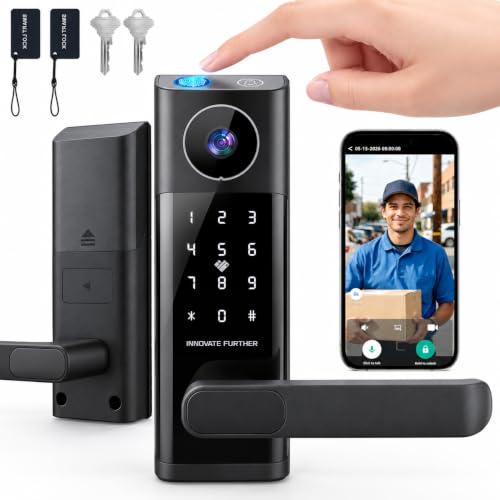
wrydao Smart Lock with Video Doorbell and Fingerprint

SMONET Smart Front Door Lock Set with Apple Home Key and WiFi

HEANTLE Fingerprint Smart Deadbolt with Touchscreen Keypad

Kwikset SmartCode 260 Keypad Deadbolt in Matte Black

Yale Assure Lock 2 Touch Keypad Deadbolt with WiFi

Yale Assure Lock 2 Touchscreen Keypad Deadbolt with WiFi
What Each Pick Brings To The Table
Daily arrivals benefit from having more than one way into the door. The wrydao lock combines fingerprint recognition, a numeric code, an IC card, app control, and a backup key, so a forgotten phone or a child carrying a backpack doesn’t stop entry.
Its doorbell-linked video function adds useful context for people who want to know who is at the door before opening it. Compared with the simpler Kwikset SmartCode 260 later in this list, the wrydao option is better for households that value flexible credentials and visitor visibility, though app setup adds another layer to manage.
Everyday Wins
- Five entry methods cover family, guests, and emergency access.
- Doorbell-triggered video helps you screen visitors remotely.
- Fingerprint access suits a household carrying bags or sports gear.
- Backup-key access provides a fallback for power or connectivity interruptions.
Things To Consider
- The video and app functions create more setup and maintenance than a basic keypad lock.
- Network-dependent features may be less useful during an internet outage.
At A Glance
Who It Suits Best
You benefit most from this model in a busy family home where several people need different entry methods and visitor screening matters.
Where Another Pick Shines
The Kwikset SmartCode 260 suits you better when straightforward keypad access and fewer connected features are the priority.
Apple Home Key support gives the SMONET lock a natural fit for homes where an iPhone or Apple Watch already handles daily access. The built-in WiFi also reduces the need for a separate network bridge, which can simplify remote control compared with locks that require a gateway.
That convenience comes with an ecosystem consideration. Your household can still use passcodes, fingerprint access, app control, voice control, and a backup key, so Android users aren’t locked out, but Apple Home Key itself requires compatible devices and the appropriate home setup.
Well-Handled Touches
- Apple Home Key offers tap-based entry for compatible devices.
- Built-in WiFi supports direct connected-home control.
- Fingerprint, passcode, app, voice, and backup-key options keep entry flexible.
- Useful for mixed-device households that aren’t tied to one phone brand.
Worth Noting
- Apple Home Key requires compatible Apple hardware and setup, limiting its value for Android-only homes.
- Remote features depend on a stable home network.
- WiFi and app management require occasional attention to permissions and firmware updates.
Quick Facts
Built With In Mind
You gain the most from this lock in an Apple-centered home with frequent mobile entry and a preference for direct WiFi control.
A Better Fit Elsewhere
The Yale Assure Lock 2 Touch Keypad Deadbolt is a better fit for you when a traditional keypad and remote guest access matter more than Apple Home Key.
Credential flexibility is the central reason to consider the HEANTLE deadbolt. It supports app access, fingerprint, passcode, an IC fob, a mechanical key, remote access through a WiFi gateway, and voice control, covering family members, guests, and rental situations in one lock.
Its touchscreen keypad makes the controls easy to see, while auto-lock helps the door return to a secured state after entry. You may find the remote-access option less direct than the Yale models because the gateway is required, but the broader credential range remains useful for a home with changing visitors.
What Works In Its Favor
- Seven access routes handle family, guests, and service visits.
- Touchscreen input is easier to read than a small, button-only panel.
- Auto-lock reduces the need to manually secure the door after leaving.
- Passcode storage supports up to 300 entries for high-traffic households.
Practical Considerations
- Remote entry requires a separate WiFi gateway, which adds installation and network-planning work.
- Touchscreen surfaces collect fingerprints and may need regular wiping in dusty or humid conditions.
Feature Breakdown
Who Will Love This
This lock fits you best when a busy household, frequent guests, or rental access justify several credential formats and automatic relocking.
Reach For A Different Pick When
You may prefer the Yale Assure Lock 2 Touch Keypad Deadbolt for direct WiFi operation without planning around a gateway.
For a straightforward move away from physical keys, the Kwikset SmartCode 260 keeps the concept focused. Its keypad supports customizable user codes, so family members and trusted guests can receive separate access without sharing one code.
Unlike the video-equipped wrydao and the network-heavy Yale options, this lock is built around the essentials: code entry, auto-lock behavior, and a familiar deadbolt format. In a rental, home office, or busy side entrance, that restraint can be more useful than a long feature list.
Notable Gains
- Custom codes make it simple to separate household access from guest access.
- Auto-lock helps keep the door secured after a busy departure.
- Matte black finish suits contemporary hardware and common interior doors.
- A keypad-centered design avoids unnecessary app dependence for daily entry.
Minor Gripes
- It lacks the video, fingerprint, and direct WiFi functions offered by several adjacent models.
- Changing or remembering many custom codes can become inconvenient without a connected management system.
Key Product Details
The Right Fit
You’ll appreciate this model most in a home or rental where keypad-based guest access matters more than remote monitoring or fingerprint entry.
Another Choice May Suit
The HEANTLE Fingerprint Smart Deadbolt is a better fit for you when multiple access methods, including fingerprints and an IC fob, are worth the extra setup.
Remote access is the main reason to choose the Yale Assure Lock 2 Touch Keypad Deadbolt. Its built-in WiFi supports connected control without requiring a separate hub, which suits a vacation rental, a home you visit periodically, or a front door you want to monitor from another location.
The keypad gives arriving guests a physical entry method, while app-based sharing can provide temporary, individual access. Compared with the Kwikset SmartCode 260, Yale adds remote administration and a more connected ownership experience, but also asks you to maintain a network connection and compatible app setup.
Where It Delivers
- Built-in WiFi enables remote lock and access control.
- Temporary guest codes suit rentals and short visits without key exchanges.
- Direct network connection avoids a separate hub for routine operation.
- Keypad entry remains useful when a guest has no smartphone access.
Small Caveats
- Remote features depend on network reliability and app configuration.
- It provides fewer credential types than the HEANTLE lock.
Essential Details
Made For
This model fits you best as a rental host or a household that wants remote guest management and direct WiFi access without another hub.
Consider Something Else When
The Kwikset SmartCode 260 is a better fit for you when local keypad entry is enough and remote administration is not a priority.
The touchscreen version of the Yale Assure Lock 2 emphasizes a clean, modern front-door interface. It connects directly to 2.4 GHz or 5 GHz home networks, so you can manage entry from the Yale Access app without placing a separate hub between the lock and your router.
That makes it attractive for a home office, apartment, or main entrance where appearance and remote control both count. Compared with the Kwikset SmartCode 260, Yale provides a more connected design, while the touchscreen surface may need more regular cleaning than a physical-button keypad.
The Upside
- Direct 2.4 GHz or 5 GHz WiFi support simplifies network planning.
- Touchscreen entry creates a modern appearance at the front door.
- Remote app control supports access changes while you are away.
- No separate hub is needed for the stated connection.
Details To Watch
- Touchscreens show fingerprints and smudges more readily than button-style keypads.
- Connected entry depends on router placement, signal strength, and app setup.
Right Fit For
You’ll find this model most useful when you want a contemporary lock with direct WiFi control and comfortable app-based management.
Swap It Out When
The Yale Assure Lock 2 Touch Keypad Deadbolt is a better fit for you when you prefer tactile buttons over a touchscreen surface.
What To Prioritize In A Connected Front Door
Start with the door and access pattern. A keypad lock needs enough physical clearance for its handle, keypad, and strike plate, so measure the door, frame, and backset before ordering. The best connected feature is the one your household will actually use: a passcode, fingerprint, phone-based credential, or a backup key.
Next, check the network and ecosystem. WiFi locks need a stable home connection, while Bluetooth-only models may require a separate gateway for remote entry. Apple Home Key also depends on compatible devices, so mixed households should favor a lock with several conventional access options.
Installation deserves the same attention as software. Confirm door thickness, required clearance, and whether the supplied hardware fits your existing opening. Touchscreen locks may collect residue, and deadbolts can expose different battery compartments depending on the model, so understanding the physical setup helps avoid avoidable maintenance later.
Common Pitfalls In Connected Entry
Mistakes Worth Dodging
A common mistake is choosing a lock for its app before checking the door. Measure first, then confirm the keypad, handle, and strike fit. Another trap is assuming every WiFi lock works with every ecosystem, so verify phone compatibility, network requirements, and guest-code management before installation.
What Separates Premium From Basic
Higher-tier models tend to add direct WiFi, more credential formats, or integrated video rather than simply improving the keypad. Those additions help rental hosts, frequent guests, and people who need remote control. A basic model remains sensible for a single entrance where local passcodes and a mechanical key handle everyday use.
Frequently Asked Questions
Do keypad door locks work during a power outage?
Many models include a backup key or another manual entry method, but the available option depends on the lock. Check the battery and emergency-entry details before installation.
Can I use these locks without a smartphone?
Yes, local keypad entry remains the primary function on most models. Smartphone control adds remote access, temporary-code sharing, and app-based management.
What network does a WiFi keypad lock need?
The Yale Assure Lock 2 Touchscreen model supports 2.4 GHz and 5 GHz networks. Other locks may use Bluetooth or require a WiFi gateway, so review the connection requirements closely.
How many guest codes can a smart lock hold?
Capacity varies considerably. The HEANTLE model supports up to 300 passcodes, while the Kwikset SmartCode 260 supports 50 customizable codes.
Are keypad locks suitable for rental properties?
They can suit rentals because temporary codes reduce key handoffs and let you change guest access. Choose a model with remote management and confirm the property rules before fitting it.
