Renting a home often means living with spaces you cannot customize permanently. A label maker helps you identify pantry items, storage bins, cables, office files, and shared areas without making permanent changes. The right model depends on label width, portability, keyboard access, and the kinds of materials you need to mark.
A Closer Look At The Lineup

SUPVAN E10 Bluetooth Label Maker with 3 Tapes
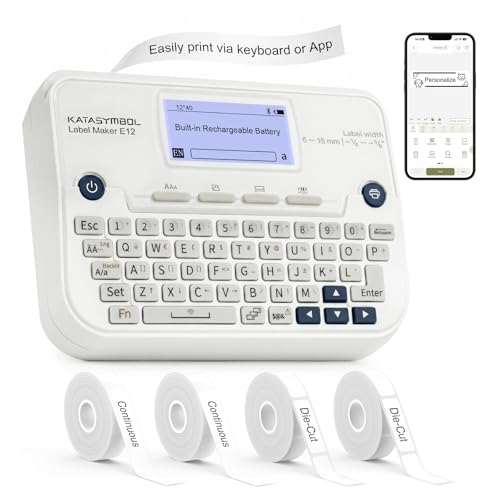
SUPVAN E12 Keyboard & Bluetooth Label Maker with 4 Tapes

SUPVAN G15M Mini Portable Label Maker with Heat Shrink Tube

SUPVAN T50M Pro Bluetooth Label Maker with Tape, Black

SUPVAN G15M Keyboard & Bluetooth Label Maker with Heat Shrink Tube

SUPVAN E11 Keyboard & Bluetooth Label Maker with 4 Tapes
A Closer Look At Each Pick
The E10 turns a rented kitchen or entryway into a more manageable system without drilling, painting, or replacing drawers. Bluetooth app editing makes it useful for naming pantry containers, folders, cables, and school materials, while the bundled tapes give you a usable starting point.
Compared with the keyboard-equipped E12 and E11, the E10 is more dependent on your phone, so its fit depends on your labeling rhythm. For apartment residents who mostly create short text labels, that trade-off is easy to live with.
Everyday Wins
- Bluetooth app support allows you to create text and simple custom designs from a phone or tablet.
- Three included tapes cover useful household starting points, reducing the need to build a supply immediately.
- Rechargeable operation supports repeat use across kitchens, closets, and office drawers.
- Thermal printing uses no ink or toner, so routine relabeling stays simpler.
Small Caveats
- Phone-based editing may feel less direct than a physical keyboard for frequent labeling.
- Replacement tape stock becomes an ongoing ownership consideration, particularly for large labeling projects.
At A Glance
Made For Renters With Small Storage Jobs
This model suits renters who want clear pantry, closet, and entryway labels without committing to a larger workflow.
Where Another Pick Shines
The SUPVAN E12 is a better fit for people who type labels frequently and want faster keyboard-first production.
The E12 adds a physical keyboard and backlit display to the app-based approach offered by the E10. That combination makes it easier to create many short labels in succession, which suits a busy kitchen, home office, or shared household where several people label items throughout the day.
Its rechargeable design keeps the device cordless, although the keyboard and display make it less pocketable than the G15M Mini. For frequent apartment organization, the extra input method can feel more natural than repeatedly reaching for a phone.
A Few Strong Suits
- Keyboard entry speeds up repetitive labels for bins, folders, and pantry goods.
- Bluetooth app support expands the options beyond simple keyboard text.
- Backlit display improves visibility in dim closets and evening workspaces.
- Four included tapes provide a broader starting supply than the E10 bundle.
Points To Keep In Mind
- The larger control layout takes more desk or drawer space than a mini model.
- App-based custom layouts still require compatible phone connectivity and setup time.
Quick Facts
Who It Suits Best
The E12 fits renters who create many small labels and prefer physical typing over app-only entry.
Reach For A Different Pick When
The SUPVAN G15M Mini is the more portable choice for labeling away from a desk or for compact storage areas.
The G15M Mini is built for the awkward corners of rental life: a narrow utility closet, a shared garage shelf, or a box of cables that needs sorting now. It accepts heat-shrink tubes alongside continuous, fixed-size, and cable labels, giving you more ways to identify different materials.
Its compact body and rechargeable battery make it easier to carry than the E12, though the smaller format may not suit long, detailed app designs. For a renter maintaining a mixed set of household and technical items, that flexibility matters.
What Pays Off
- Supports four label formats, including heat-shrink tubes for wire identification.
- Compact dimensions help it fit into a drawer, toolbox, or travel case.
- A 1,200 mAh rechargeable battery supports cordless work in a garage or closet.
- Lightweight construction makes on-the-go labeling less disruptive.
Areas To Watch
- Heat-shrink labeling requires compatible tubing and careful positioning during setup.
- The compact interface may be less comfortable for extended text entry.
Right Fit For
This model suits renters who organize both household possessions and cables and need a compact device for varied materials.
Swap It Out When
The SUPVAN T50M Pro is a better fit for wide, presentation-style labels and custom graphics in a small business setting.
The T50M Pro handles broader labels than the compact G15M, which makes it more useful for address labels, product information, barcodes, and larger storage bins. In a rental used as a home office or small studio, that wider format can turn a simple organizer into a more polished system.
Bluetooth editing lets you bring images from a phone, tablet, or computer into label layouts, while the included tape keeps initial setup simple. You may find the design workflow better suited to planned projects than quick pantry marking.
The Good Stuff
- Prints labels from 3/4-inch to 2-inch wide for varied storage and packaging needs.
- App editing supports images, QR codes, barcodes, and brand elements.
- Wide output suits storage bins, bottles, jars, and product packaging.
- Bluetooth design removes the need to work only from the machine keyboard.
Less-Strong Areas
- Its larger tape format uses more material than a compact label.
- Phone or computer setup adds complexity for simple one-word labels.
Feature Snapshot
Built With In Mind
The T50M Pro fits renters who run a home office, studio, or small organization and need labels with more visual information.
A Better Fit Elsewhere
The SUPVAN E11 is the simpler alternative for quick home organization without the same emphasis on wide, graphic labels.
The keyboard-equipped G15M extends the portable G15M concept into a more practical workshop tool. Eleven label types cover heat-shrink tubes, cable wraps, cable flags, marking tags, continuous labels, and die-cut labels, allowing you to label wiring, network cabling, terminal blocks, and equipment with more consistency.
Physical typing helps during cable batches, while Bluetooth app support handles customized layouts. You may find this model more specialized than a standard rental organizer, but it earns its place for renters with a garage, network rack, or home workshop.
Everyday Perks
- Eleven label formats cover common wiring and equipment-marking tasks.
- Keyboard entry supports efficient batches of similar labels.
- Bluetooth editing expands the machine beyond fixed text and basic symbols.
- Heat-shrink support helps organize electrical and network cables.
Details To Watch
- Specialized label materials add more setup steps than standard tape labeling.
- Workshop-focused features may be unnecessary for a kitchen-only organization plan.
Technical Highlights
Who Should Grab It
This model suits renters who maintain cables, network equipment, or workshop tools and need labels that stay attached to demanding materials.
Where A Sibling Pick Shines
The SUPVAN E10 is the better fit for straightforward pantry and closet labels where specialized cable media would be unnecessary.
The E11 gives you a practical middle ground between the app-only E10 and the more cable-focused G15M. Its keyboard supports quick household labels, while Bluetooth access helps with pantry items, garage tools, office files, and school supplies. Four tapes provide a useful starting inventory for a move-in organization project.
The rechargeable battery supports cordless use around the home, although you may still prefer a smaller device for a small apartment with limited storage. For frequent labeling across several rooms, the E11 feels more versatile than a single-purpose tape-only model.
Practical Advantages
- Physical keyboard speeds up common household and office labels.
- Bluetooth app support handles customized text and designs.
- Four included tapes cover several initial organizing categories.
- Rechargeable operation supports labeling away from an outlet.
Possible Compromises
- The rechargeable battery still creates a charging routine you must remember.
- Four tapes may run quickly during a whole-home move-in project.
Made For Everyday Apartment Organization
The E11 suits renters who want flexible labeling for kitchens, offices, school supplies, and mixed household storage.
Consider Something Else When
The SUPVAN E12 is the better fit for people who prioritize a backlit display and frequent keyboard-based labeling.
What Matters Most For Rental Labeling
A label maker works best when its output matches the labels you already need. Think about the size and material of your storage bins, pantry containers, network cables, or shipping supplies before choosing a model. A compact machine may be more useful in a tight apartment, while a wide-format model handles more detailed product labels.
Keyboard input can save time during large projects because repeated labels do not require constant phone interaction. Bluetooth editing adds flexibility for images and custom layouts, though it introduces another device to charge, pair, and maintain. Consider your storage situation carefully, especially in a shared home where several people may use the machine.
Heat-shrink tubes are different from ordinary adhesive labels. They wrap around a cable and shrink around the surface, making them useful for electrical and network identification. Renters with only pantry and closet items can usually keep the decision simpler, while workshop users may need this specialized capability.
Common Mistakes In Rental Labeling
Pitfalls Shoppers Hit
Many people choose by color or compact size before checking label compatibility. Compare tape width, supported materials, and refill requirements first, because a machine that cannot print the right label may remain unused. A second common mistake is overlooking charging and storage, especially in a small utility closet or shared office.
When Paying More Pays Off
A higher-tier model earns its cost through wider output, more label formats, faster text entry, or more advanced design options. Those features matter for cable projects, product packaging, or large move-in batches, while basic pantry organization may be fully handled by a simpler model. Your labeling volume should decide whether the extra capability is useful.
Frequently Asked Questions
Can renters use label makers without modifying walls or cabinets?
Yes. Adhesive labels and heat-shrink tubes can identify temporary belongings without drilling, painting, or installing permanent fixtures. Choose removable or suitable labels for surfaces that may be inspected at move-out.
Are keyboard label makers easier for frequent use?
A physical keyboard can make repeated text labels faster because you do not need to reach for a phone for every word. Bluetooth editing remains useful for custom graphics and more involved designs.
Which label maker is best for cable organization?
The SUPVAN G15M models are the more relevant choices because they support heat-shrink tubes and other cable-label formats. Your choice depends on portability versus keyboard access.
Do label makers need ink or toner?
The listed SUPVAN models use thermal-style label output, so routine printing does not require ink or toner cartridges. Consumables are primarily the compatible labels and any specialized tubing used with the machine.
How much label tape should a new renter buy?
The included tapes provide a starting point for a first organization session. A larger move-in, pantry, or workshop project may require additional compatible rolls, so check the machine’s label format before stocking up.
