
A keypad door lock can remove the need to search for a key, which is useful for older adults managing mobility limits, caregiving schedules, or occasional carrying problems. Clear number layouts, illuminated controls, reliable code entry, and a mechanical fallback matter more than elaborate connected features. Your best option depends on your door hardware, technical comfort, and whether anyone needs remote access.
A Fast Comparison Of The Options
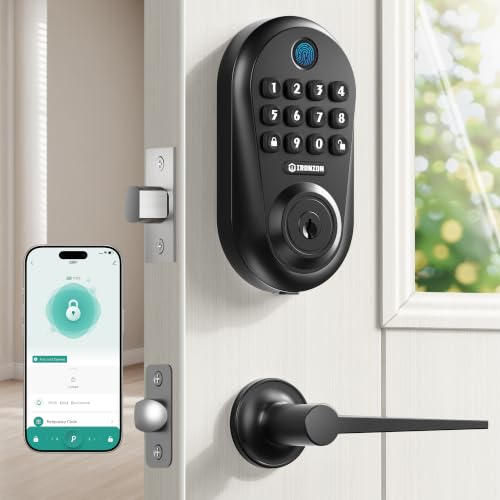
IRONZON 350YS 5-in-1 Keyless Entry Smart Deadbolt

Sifely Fingerprint Smart Door Lock with Handle and Keypad

Yamiry Keypad Smart Door Knob Lock with Handle

SoHoMiLL YL 99 Electronic Keypad Door Knob Model-B

Yale Assure Lock 2 Touch Keypad Deadbolt with Wi-Fi

Yale Assure Lock 2 Touchscreen Keypad Deadbolt with Wi-Fi
A Deeper Look At The Lineup
The IRONZON 350YS suits a household that wants more than one way into the house. Fingerprint sensing, numbered codes, an interior knob, and two physical keys cover daily family use, guests, and a fallback after an electronic failure.
For an older adult who sometimes carries bags or walks with a cane, the combination of a handle-style interior knob and automatic locking may feel more natural than managing a small thumbturn. App control adds convenience for caregivers, although remote use requires the specified Wi-Fi gateway.
Good Reasons To Consider
- Fingerprint storage accommodates as many as 50 users, which suits extended family and frequent visitors.
- Passcode storage supports up to 100 users for flexible household or rental access.
- Auto-lock, passage mode, privacy mode, and an anti-peep keypad broaden everyday control.
- Two backup keys provide a physical fallback when batteries or electronics create trouble.
Things To Consider
- Remote app access requires compatible Wi-Fi hardware, making setup more involved than a standalone keypad.
- The several access systems increase setup and code-management tasks, so household members may need clear instructions.
Key Specs
Made For
Multi-generational homes that want keypad, fingerprint, shared, and backup-key access in one deadbolt.
A Better Fit Elsewhere
Sifely Fingerprint Smart Door Lock offers a simpler fit for households that want fingerprint and code entry without remote app control.
Local Bluetooth control keeps the Sifely focused on the front door rather than a broader connected system. App-based management means software control through a nearby phone connection, so it works well for a household comfortable with basic smart-home setup but without a Wi-Fi gateway.
The listed 0.3-second fingerprint response could feel immediate for daily returns from gardening or errands. Compared with the IRONZON 350YS, the access choices are narrower, but that restraint may be easier for a senior who does not need remote administration.
Notable Upsides
- Fingerprint recognition is listed at 0.3 seconds, reducing waiting during frequent family entry.
- Bluetooth control works locally, which suits homes without a hub or extensive network equipment.
- The included handle gives a familiar interior grip for users with limited finger dexterity.
Practical Considerations
- Local Bluetooth control may not provide the same remote convenience as the IRONZON 350YS.
- Older adults must reliably place a clean finger on the sensor, so an alternate code and physical access method remain important.
- Installation fit and door alignment should be checked carefully because retrofit locks can sit differently within the bore.
Feature Snapshot
Built With In Mind
Couples, families, and small offices wanting local smart access with a straightforward handle and fingerprint sensor.
Consider Something Else When
Yale Assure Lock 2 Touch Keypad Deadbolt fits caregivers who need access management from beyond Bluetooth range.
The Yamiry removes fingerprint sensors and app connections, leaving a straightforward backlit keypad and lever. That simpler layout may reduce the number of settings an older adult must learn, particularly in an apartment or secondary entrance.
Its aluminum-alloy body and IP54 weather-resistance rating indicate attention to exterior use, while the low-battery warning helps prevent abrupt lockouts. The stated screwdriver installation under 15 minutes is useful, though your actual time may vary with door alignment and hardware.
Useful Strengths
- Illuminated digits improve visibility for early-morning or nighttime entry.
- Programmable 4- to 8-digit codes provide separate access for family members and caregivers.
- The handle design offers a larger gripping target than a compact deadbolt thumbturn.
- IP54 weather resistance suits an exterior door exposed to ordinary rain and dust.
Small Caveats
- Its 20-code capacity is more modest than the larger user allowances in the IRONZON 350YS.
- A spring-latch-style knob lock and deadbolt perform different jobs, so confirm your door hardware before ordering.
- Battery-powered keypads need routine monitoring, and weather exposure can shorten service life if seals deteriorate.
The Right Fit
Older adults and renters who value a lit handle keypad more than fingerprints, app access, or automatic deadbolt security.
Where A Sibling Pick Shines
The IRONZON 350YS suits larger households that need fingerprint recognition, more stored users, and remote app control.
The SoHoMiLL YL 99 is built around familiar keypad and handle operation, with no phone connection or app to configure. For a senior who resists technology changes, that directness can matter more than remote access or biometric entry.
This is a spring-latch knob rather than a deadbolt, so it may align with common interior or apartment doors but not heavier exterior security hardware. The included mechanical key and low-battery warning create useful layers of ownership support.
Standout Benefits
- A master code plus as many as eight user codes separates regular access from household programming.
- The lock relocks three seconds after an outside entry, reducing the chance that an open door is forgotten.
- A mechanical key provides direct entry during a low-battery or electronic setback.
- Its included installation hardware suits a straightforward do-it-yourself replacement project.
Trade Offs
- No phone connection means you cannot send temporary access or manage the lock remotely.
- A spring latch does not provide the same resistance as a deadbolt, so door construction and latch placement matter.
- You may need a clear code card because electronic-only users can still forget programmed credentials.
Core Details
Who Will Love This
Seniors comfortable with number pads who want manageable controls and no connected account on a compatible standard door.
Reach For A Different Pick When
Yale Assure Lock 2 Touchscreen Keypad Deadbolt suits people who prioritize deadbolt construction and remote entry over a simple offline system.
Wi-Fi control makes the Yale Assure Lock 2 Touch Keypad Deadbolt useful when relatives, caregivers, or a rental host need to manage access remotely. Temporary, unique credentials can reduce the key-return routine during visits or guest stays.
For daily entry, the touch keypad offers a more integrated exterior surface than the raised buttons on the Yamiry. Connectivity also adds responsibility, since the lock depends on network access and app permissions for remote functions.
Practical Advantages
- Shared digital credentials suit families coordinating entry across different schedules.
- Remote lock control helps a caregiver check access without traveling to the property.
- The deadbolt format offers a stronger exterior-locking option than a basic spring-latch knob.
- A touch keypad presents a clean control surface that needs routine wiping to remain responsive.
Points To Keep In Mind
- Wi-Fi setup and app configuration create more steps than the standalone SoHoMiLL system.
- Connected entry depends on account access, power, and network reliability, so keep your mechanical access method accessible.
Made For
Families with active caregivers, frequent travelers, or household members who need remote access control from another location.
Swap It Out When
SoHoMiLL YL 99 suits a simpler home where offline keypad operation matters more than remote management.
The Yale Assure Lock 2 Touchscreen places Wi-Fi management behind a full touchscreen keypad, making remote access the defining difference from the simpler offline locks. It connects directly to a 2.4 GHz or 5 GHz home network, so a separate hub is not stated as necessary.
That makes it a logical fit for a vacation property, home office, or household coordinating visitors. Compared with the Touch Keypad model, the visible difference is the screen format, while the broader appeal lies in connected access rather than distinct door hardware.
A Few Highlights
- Direct 2.4 GHz or 5 GHz network support simplifies remote access without a separately stated hub.
- App-based control can reduce physical key exchanges during guest stays and temporary visits.
- A full touchscreen creates one large control surface that may be easier to target than tiny separate keys.
- The deadbolt design gives the entry door a more substantial locking format.
Less Ideal Details
- Touchscreens need regular cleaning because dust or moisture can affect touch response and visible digits.
- The connected setup may feel excessive for a senior who only needs a keypad and mechanical key.
- Network-dependent features add configuration work, so confirm your home network supports the lock before installation.
Technical Highlights
Whose Shelf It Belongs On
Tech-comfortable seniors, caregivers, and rental hosts who value remote access more than keypad-only simplicity.
Another Choice May Suit
Yamiry Keypad Smart Door Knob Lock fits homeowners wanting exterior weather resistance, a lit keypad, and no app setup.
What To Prioritize In A Senior-Friendly Door Lock
Start With Familiar Controls
A large, illuminated keypad can be easier to operate than a touchscreen or fingerprint reader. Raised digits also provide tactile feedback, which may feel more predictable for anyone with reduced vision or limited touch sensitivity. Choose a model whose controls you can use comfortably before considering connected extras.
Match The Lock To The Door
A deadbolt and a spring-latch knob serve different purposes. Deadbolts suit exterior security applications, while knob sets often fit standard interior or apartment doors. Measure the bore, backset, door thickness, and strike placement before removing existing hardware.
Decide How Much Connectivity You Need
A connected lock can share temporary access and support remote control, but it also requires Wi-Fi, an app, and sensible account security. Basic keypad models are easier to maintain and may be more appropriate for a home with simple routines. Connected access is most useful for caregivers, travelers, and rental hosts.
Keep A Physical Backup
PIN pads, fingerprint sensors, and touchscreens all depend on electronics and power. A mechanical key or dependable interior operation is valuable when batteries fade or a screen becomes unresponsive. Store fallback keys somewhere household members can find without unlocking the front door.
Avoid A Low-Maintenance Mistake
A fingerprint sensor saves key handling, yet it depends on consistent finger placement and a clean contact surface. Similarly, outdoor touch controls need occasional wiping to remain responsive. Choose based on realistic habits rather than the most advanced interface available.
Know What Premium Connectivity Adds
Higher-tier models often add Wi-Fi, app controls, shared credentials, and deadbolt construction. Those features suit homes where relatives or guests need temporary or remote entry. A simpler keypad lock is more appropriate when daily access stays local and nobody needs administrative control.
Frequently Asked Questions
Are keypad door locks easier than traditional keys?
For many older adults, yes, because a saved code or fingerprint removes the need to locate and turn a physical key. Ease depends on keypad visibility, familiar controls, and a reliable backup method.
Do I need Wi-Fi for a keypad lock?
No. Standalone models such as the SoHoMiLL YL 99 operate without phone connectivity, while the Yale Assure Lock 2 options use Wi-Fi for remote features.
Which lock is simplest for a standard apartment door?
The Yamiry Keypad Smart Door Knob Lock uses an illuminated code keypad and conventional handle, making it a practical consideration for compatible standard doors. Confirm the measurements and latch configuration before installation.
What happens during a power failure?
Battery-operated locks generally need a mechanical fallback because electronic entry may stop after the batteries are depleted. The IRONZON 350YS and SoHoMiLL YL 99 include physical keys, while every connected model should also have a planned entry alternative.
