
Security cameras can make a home feel more attentive, but running several always-on devices adds clutter and electricity use. The practical approach is to choose equipment that covers the spaces that matter without filling every room with hardware. A wireless system with optional professional monitoring, a single pan-tilt camera, or a TV-integrated model can fit that need.
Your priorities may include pets, children, entry points, night visibility, or outages. These six options cover different combinations of indoor monitoring, whole-home sensors, wireless convenience, and focused coverage. Energy-conscious households should still check each camera’s power requirements and recording settings because no model can promise lower electricity use without knowing how you configure it.
Your Options, Compared

SimpliSafe 11-Piece Gen 3 Wireless Home Security System with Indoor HD Camera

SimpliSafe 8-Piece Wireless Home Security System, Optional Monitoring

SimpliSafe 10-Piece Wireless Home Security System with Outdoor Camera

Luna 2K Indoor Camera with Dual-Band WiFi and 360° Pan-Tilt
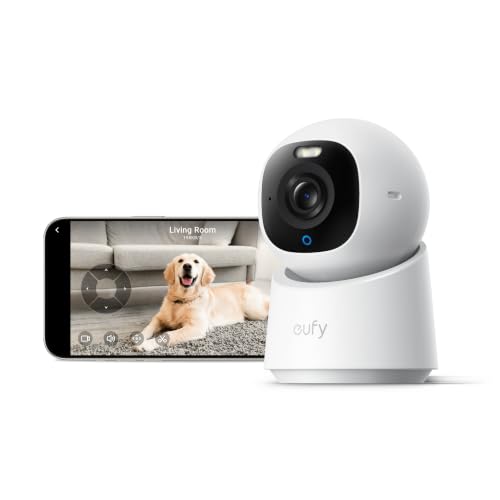
eufy Security E30 4K Indoor Camera

Roku Indoor Camera with 1080p Color Night Vision
The Strengths Of Each Pick
The 11-piece configuration suits homes that need more than a single room on camera. It combines an indoor HD camera with a broader security system, so contact sensors, entry protection, and professional monitoring can work as one connected setup.
Compared with the 8-piece model, the extra components may cover more doors or sensing areas without requiring another stand-alone camera. The trade-off is installation complexity and the number of powered devices in your home, so energy-conscious homes should place each component where it provides distinct coverage.
Points In Its Favor
- Wireless components reduce cable routing throughout the home.
- The indoor camera includes a controllable privacy shutter for selected times.
- Optional 24/7 professional monitoring supports alarm response without making it mandatory.
- Support is available around the clock for setup, connectivity, and troubleshooting questions.
- No-contract monitoring gives you flexibility in how the service is structured.
Things To Consider
- The 11-piece count can create more installation work than a single-camera setup.
- Owners should periodically dust sensors and keep camera lenses clear.
- Professional monitoring introduces an ongoing service choice beyond the hardware.
Quick Facts
Made For Managed Homes
You benefit most from this system in a medium or large home that needs coordinated entry sensors, indoor visibility, and optional professional monitoring.
Where Another Pick Suits Better
The Luna 2K Indoor Camera fits smaller homes better when one rotating view is sufficient and several system components would add unnecessary hardware.
This smaller bundle targets homes where entry points and motion coverage matter more than a dedicated indoor video camera. Its wireless sensors can protect accessible areas while leaving your walls free of new wiring.
That makes it a practical middle ground between a single camera and the 11-piece Gen 3 system. For apartments, rentals, and compact floor plans, fewer components can reduce visual clutter and setup effort, although the listed package does not include the indoor HD camera found in the larger configuration.
Where It Helps
- Eight components provide a manageable starting point for entry and motion protection.
- Wireless installation avoids routing new cables through doors and walls.
- The base station has a backup battery, a 100 dB siren, and network backup when monitoring is active.
- Professional monitoring remains optional rather than built into every use.
Practical Considerations
- There is no listed indoor camera for visual monitoring through this bundle.
- Sensor placement takes planning to prevent unnecessary alerts.
- Network backup depends on a professional monitoring plan.
- Battery and sensor maintenance belongs on your routine household checklist.
The Right Fit
This configuration suits apartment residents and smaller homes that prioritize access detection, wireless sensors, and outage support over continuous indoor video.
Another Choice May Suit
The eufy Security E30 4K Indoor Camera is a better fit for a single room where detailed video and pet monitoring outweigh whole-home sensor coverage.
A system with indoor sensors and an outdoor camera makes sense for households watching both the inside and the primary exterior approach. The 10-piece count places it between the 8- and 11-piece SimpliSafe configurations while adding exterior visual coverage.
Compared with the standalone Luna and eufy cameras, this package can serve as a broader property system. You may still add an indoor camera later for a more detailed view, but positioning that unit where it complements rather than duplicates the existing sensors can keep power and network demands under control.
Strengths Worth Knowing
- Outdoor video extends awareness beyond indoor entry sensors.
- Ten components balance whole-home protection with a moderate hardware count.
- Optional 24/7 monitoring remains available for households wanting a response service.
- Wireless devices simplify placement where wiring would be disruptive.
- Support covers setup, connection, and troubleshooting concerns.
Small Caveats
- Exterior placement exposes the camera to weather and changing light.
- Outdoor and indoor views require careful angle adjustment to limit overlap.
- The package does not list the dedicated indoor HD camera included with the 11-piece bundle.
Key Product Details
Built With In Mind
This system fits homeowners who need coordinated indoor sensing and exterior visibility without starting with the largest available package.
Consider Something Else When
The SimpliSafe 8-Piece Wireless Home Security System suits compact spaces where exterior video would duplicate other coverage.
A single rotating camera can cover more of a compact room than several fixed devices placed in different corners. The Luna model’s 2K resolution, 360-degree pan, tilt, and automatic tracking suit apartments, nurseries, and pet rooms where one viewpoint must follow movement.
Dual-band WiFi means the camera can connect through either the 2.4 GHz or 5 GHz band, while Bluetooth assists pairing. The trade-off is that one device still represents an always-connected electrical load, so turning it off during unoccupied hours may matter more to your household than another small camera would.
The Value In It
- One rotating unit replaces the need for multiple fixed views in a small room.
- 2K recording captures more detail than a lower-resolution alternative.
- Automatic tracking follows movement within the camera’s field of view.
- Custom motion zones concentrate alerts on relevant areas.
Details To Watch
- Pan and tilt do not change the physical mounting point, so placement still limits the view.
- Motion settings may need adjustment around pets and passing household traffic.
- The lens and housing require occasional cleaning in dusty rooms.
Technical Highlights
Made For Small Rooms
You benefit most from this camera in an apartment, nursery, or pet room where one rotating view provides enough coverage.
A Better Fit Elsewhere
The eufy Security E30 4K Indoor Camera better serves households that place image clarity above the Luna model’s rotating coverage.
The eufy E30 concentrates on detailed indoor video rather than a full alarm system. Its 4K resolution and day-or-night recording make it useful for checking a pet, child, or family member, particularly when you need to distinguish small movement across a room.
Two-way audio supports direct communication, while the 360-degree view reduces blind spots. Because the camera can also work as a pet camera, it may prevent a second dedicated device in pet households, which is a more credible route to reduced energy use than swapping one always-on camera for another.
A Few Highlights
- 4K recording provides detailed indoor footage for close observation.
- Two-way audio lets you speak with family members or check in on a pet.
- No-subscription operation supports households avoiding recurring feature fees.
- Quick Focus Tap and panoramic viewing make it easier to inspect specific areas.
Less Ideal Details
- High resolution alone does not guarantee useful footage in a very dark room.
- A single indoor camera cannot add door sensors or outage-ready alarm coverage.
- Continuous monitoring remains a power draw, so scheduled shutoff may help some homes.
Who Will Love This
Pet households and families needing a detailed live view of one important room benefit most from the E30’s 4K recording and audio.
Swap It Out When
The SimpliSafe 8-Piece Wireless Home Security System is a better fit when entry sensors matter more than high-resolution indoor video.
The Roku camera fits into an existing streaming setup, allowing indoor views to appear on a Roku television or player as well as a mobile app. That convenience makes it appealing for a living room, child’s room, or front indoor entry where you already watch screens.
Its 1080p HD stream and color night vision provide practical coverage without a larger multi-device bundle. Compared with the 4K eufy E30, however, the Roku model is built more around ecosystem integration and straightforward viewing, so image detail may be less compelling for rooms where fine-grained identification matters.
What Earns Its Place
- Live video can appear on compatible Roku television screens.
- Color night vision adds illumination to dark indoor scenes.
- Motion and sound detection can provide activity notifications.
- One camera is easier to manage than a complete sensor system.
Things To Weigh
- Its main advantage depends on your use of Roku televisions or players.
- 1080p footage offers less detail than the eufy E30’s 4K resolution.
- Cord placement and cleaning around the wired camera deserve attention during installation.
Feature Facts
The Right Fit
You benefit most from this camera in a home that already uses Roku screens for streaming and wants simple indoor viewing on those displays.
Reach For A Different Pick When
The Luna 2K Indoor Camera is a better fit for rooms needing automatic tracking, broad rotation, and dual-band WiFi support.
Choosing Cameras That Fit Your Home
Start With Coverage
Begin with the rooms and entry points that need attention, not with a target number of cameras. One wide-view camera may cover a compact living area, while a larger property can benefit from a combination of entry sensors, interior motion detection, and an exterior camera. Map blind spots before ordering and avoid placing devices whose views duplicate one another.
Check Connection And Power
Wireless connectivity reduces cable installation, but it still requires dependable router coverage. Dual-band WiFi can offer a useful balance because 2.4 GHz usually offers broader range while 5 GHz supports faster local connections. Wired cameras avoid WiFi congestion but require cable routing, and both approaches add electrical load that varies with their settings.
Decide How Monitoring Works
Professional monitoring adds a service team to supported alarm systems, while stand-alone cameras center on live viewing, alerts, and recording. A household wanting fewer devices may prefer one indoor camera; a larger property can justify a complete system. Confirm which features operate without a subscription and which services carry ongoing costs.
Match Resolution To The Purpose
Resolution describes how much image detail a camera can capture, but lighting, angle, and distance affect the final picture. 4K can help with a pet or child viewed across a room, while 1080p may be sufficient for general movement alerts. Prioritize night visibility, adjustable motion zones, and privacy controls over resolution alone.
Small Decisions With Big Effects
Mistakes Worth Dodging
Avoid buying several fixed cameras that show nearly the same angle. Check the room’s power layout, router distance, and viewing height before choosing a mounting point. A camera placed too high or pointed toward a bright window can produce less useful footage than a lower-resolution model positioned correctly.
What Separates Premium From Basic
Advanced models typically add higher resolution, automatic tracking, refined night views, or deeper smart-home integration. Those extras help when you need close detail or automatic camera movement. A basic 1080p model remains more efficient for occasional checks in a well-lit room. Paying more makes sense only when the extra capability solves a specific problem in your home.
